Throughout
the whole process of posting entries related with topics dealt with during
the ECO II lessons, I have come to realize the value of learning journals. One
of the learning journals’ main features, as described in the “Study Skills advice sheet” of the University of Worcester (England), is that they allow students to reflect about their own learning process. Moreover, it is also claimed
that these are not only a descriptive account of what has been done during
lessons. On the contrary, these constitute opportunities for the learners to
communicate their thinking process, i.e. why and how they did what they
did, what they think about it. I strongly agree with this description, and I
would add that learning journals allow you to make connections between the
different subjects, express your own hypotheses, share your thoughts with your
classmates, and make an ongoing assessment of your own learning process. These
factors have not only allowed me to improve my learning but also to value it
even more. It also helped me to appreciate not only the product of the learning
but the process of learning itself.
To conclude, I would like to close this last
post by making use of the saying: “every ending is also a new beginning”.
Therefore, this “learning about my own learning process” will continue, as an
ongoing and never-ending process, which will allow me to keep on growing not
only as a learner but also as a teacher. "It is not about the technology; it's about sharing knowledge and information, communicating efficiently, building learning communities and creating a culture of professionalism in schools. These are the key responsibilities of all educational leaders". Marion Ginapolis, Superintendent, Lake Orion Community Schools
sábado, 30 de agosto de 2014
jueves, 28 de agosto de 2014
On technology in the classroom: "Working in the Millennials’ classroom"

It does not come as any big surprise that students and their way of learning have changed over the years. Since learners are not the same, the classroom has also changed. Today’s teachers have to cope with the Millennials' (also known as Generation Y, and related to Digital Natives, dealt with on an older post) way of learning. These learners, who are web savvy, multi-tasking, and highly connected to via social media, are difficult to address when it comes to teaching. Not only we need to come to an understanding of the way they learn but also we need to construct the best classroom for them. When thinking about this classroom, the first thing that comes to mind is the inclusion of technology. A classroom without technology would not be a classroom for the Millennials.
In the
search for the best ways of including technology in the classroom we have come
across many devices, tools, softwares that have improved the quality of our
teaching. For example, the other day we
were learning to use Vokie to create animations that could be very useful when
thinking about the classroom pet or for making older students create a vokie to
record themselves speaking English and share it through any social network.
We also worked with programs that can help us to present words in more
entertaining ways as Tagul or Wordle. Technology
is also useful when thinking about teacher’s materials design, which is yet another
improvement for the whole teaching and learning process (as I established before on my previous post). How much should be thank the web 2.0
technology, don’t you think?
Another
thing to be taken into consideration when thinking about the building of a more "Generation Y" classroom is the inclusion of this generation’s culture into the lessons. For
example, the other day we went to a talk about the use of “selfies” as a
didactic resource.
Lastly, we
can not forget that we also belong to this generation and that, therefore, we
also have some special characteristics as Gen Y teachers. Because we are also
part of this generation we have the advantage of sharing points of view, which definitely
makes the teaching task much easier (though not less complex).
domingo, 24 de agosto de 2014
On Materials Design: "A necessary evil"
At times
material design could be seen as really time-consuming and highly incompatible
with the routine of a busy teacher, but according to what I have learnt, it is
surely worthwhile. The reasons behind
such a statement lay on the words written by Jocelyn Howard and Jae Major in
the work: “Guidelines for Designing Effective English Language Teaching Materials”.
As the authors claim, making your own
material allows you to contextualize it and up-date it paying special attention
to your students’ needs and socio-cultural setting. Moreover, it also offers
you the opportunity to give a personal touch to your teaching, something the
students will certainly appreciate.
As nothing
can be perfect, I believe designing material is a way to improve our teaching. Consequently,
it is totally worthwhile, rewarding and a “necessary evil”.
lunes, 11 de agosto de 2014
On technology in the classroom: "TPACK & SAMR, the acronyms of modern pedagogy"
Teaching
has never been easy, but nowadays technology is a tool that can be used to make
it less difficult. However, technology can be a two-faced sword because it can
also be a burden in the teaching-learning process if not properly and smartly
used. As a future
teacher, I am always in the search for how to integrate technology in my
lessons. In that search I came across two systems that can be useful
for this purpose: TPACK and SAMR.
On the one
hand, TPACK (acronym for technological pedagogical content knowledge) is a
framework for teacher knowledge for technology integration that builds on
Schulman’s descriptions of Pedagogical content knowledge (PCK, 1986/1987) which
he used to describe how PCK interact with one another to produce effective
teaching with technology. Later this concept was discussed and enlarge by other
authors with the most complete descriptions of the framework found in Mishra
and Koehler: “What is technological pedagogical content knowledge?". The TPACK
framework emphasizes the new kinds of knowledge that lie at the intersections
between technology, pedagogy, content and knowledge, representing four knowledge
bases applicable to teaching with technology: Pedagogical Content
Knowledge (PCK), Technological Content Knowledge (TCK), Technological
Pedagogical Knowledge (TPK), and the intersection of all three circles,
Technological Pedagogical Content Knowledge (TPACK). A practical example of the
application of this system in the classroom would be to ask your students to carry
out a task that involves the use of technology. For example, in my particular
case, as my lesson’s content knowledge is language I and my team work thought
of making students record themselves simulating they are radio presenters
taking about their predictions for FIFA world cup 2014. After they have done
this task in groups they could share their creations with the rest of the class
through facebook or memory sticks.
On the
other hand, we have SAMR which stands for: Substitution Augmentation
Modification and Redefinition. This model developed by Dr. Ruben Puentedura
represents the impact technology can have on teaching and learning, and the progression
that adopters of educational technology often follow as they improve the
teaching-learning process with technology. Using the same task described above
as an example, it would be at the level of modification because students will
need some technological tool to carry it out, to add music, effects (as for
example audacity) and facebook or memory sticks to share them. Besides, they
would be their own real audience as they will be sharing their recordings with
the rest of the groups. Technology in this particular task is used to redesign
part of the task and transform student learning.lunes, 26 de mayo de 2014
How to present a topic using technology? Here are 2 recommendations!
I’m for the
use of technology in the classroom. Even though sometimes it is difficult
because not all classrooms have access to technological resources, when these
resources are available we must use them.
Since this
week’s topic for ECO II is “presentation software”, I’d like to recommend you
two softwares you can use as tools to introduce some topics in your lessons.
The first
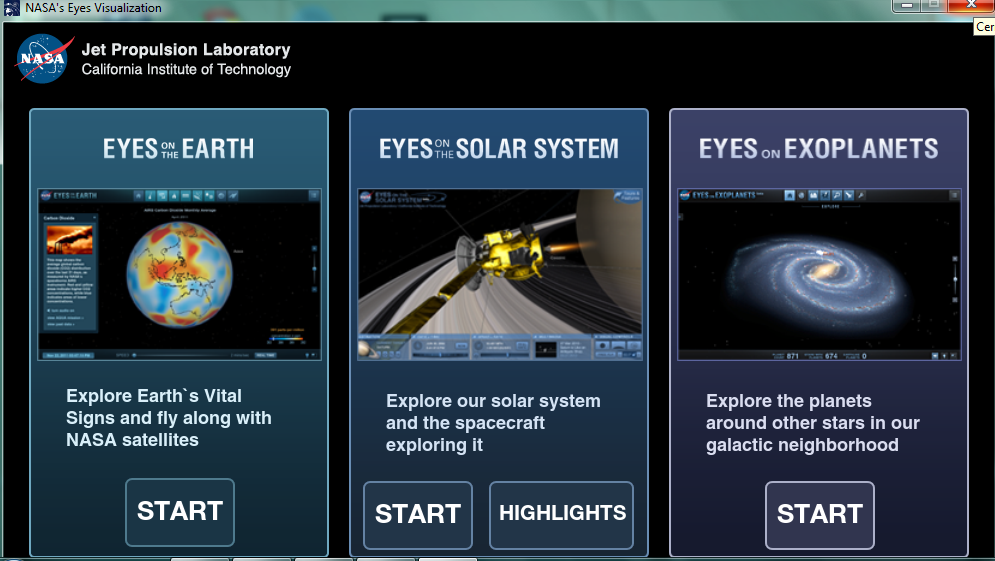
one is “NASA’s Eyes” which is a software that shows you the Solar System, the Earth or Exoplanets as
viewed from NASA’s satellites. I haven’t used it on a real lesson but it could
be useful for a “topic based” lesson (or in a lesson that is part of an interdisciplinary
project) where you deal with the Solar System and need something amusing for
students or pupils to engage in your explanation or presentation of the topic.
It is definitely more amusing than using flashcards, much cheaper for sure, and
it doesn’t need any internet connection; just a beamer. What’s more, it has the
official endorsement of NASA and it can be downloaded for free!
The second
one can also be downloaded for free from the office Microsoft official page. It
is a sort of extension for PowerPoint that allows you to present stories and
tales in one slide in the form of a book. I’ve used it and it really worked in
engaging children into the story I was telling them. My pupils loved the use of
animated images and to see a digitalized book. It was quite easy to use when
preparing the story; it just required a little of practice to coordinate my
narration and the passing of slides. Besides, you only need a beamer to use it.
All in all, it was fantastic and really useful.
So, these
are my recommendations! Hope you find them as useful as I've had!
domingo, 25 de mayo de 2014
On Internet Information Reliability: "Is any info trustworthy?"
After analysing websites and reading the official criteria to say whether these pages were “good” or “bad”, I’ve realized that sometimes we don’t take into consideration any criteria and believe in everything we see on the internet. Not only we trust in any website we come across, but we also usually are an echelon in the chain of displaying information that may not necessarily be correct or true. Think about how many times you used internet to do a practical work at school without verifying the information you used or not paying too much attention to the sources utilized. I must admit that just some years ago I acknowledged the existence of “scholar.google.com” where you can find official books and articles about any topic. Anyhow, sometimes I still search for other sources of information that may not be appropriately endorsed.
Let me give
you a clear example: Wikipedia, the most famous world-wide source of
information. Have you thought about it in terms of the criteria suggested to “judge”
this website’s validity?A quick analysis would be that the website is not completely a deception, but that you cannot yet fully rely on it. It is true that it contains the sources where the articles and descriptions are based on. It also contains the author of the information in many occasions. Is it enough to trust all information included there? After all, we readers can edit any information uploaded there whether we have a PhD or are children surfing in the internet. So… what to do?
That’s an
interesting question for us teachers-to-be who sometimes take information to
the classroom about different topics that we may not know about. What’s more, we
may not find the information we need in official pages or articles, but we may
do in Wikipedia. In this case, do we trust it? Do we take for certain something
that could have been edited by a 6-year-old child?
Well, I’ve
been through this situation because I had to do a research on monarchs from all
around the world. Let me tell you that it was not easy and in some cases the
most complete resource of information was Wikipedia. What I did was to compare
the information to other sources and to have a look at the resources used to
write the biographies. Of course, this took me ages! An amount of time I’m sure
I won’t have when I graduate. Thus, I’m still wondering where to find quality
information, reliable resources. Not saying this is a problem that has just
come up, because at times when books where the only source, the information
was sometimes not “good” either.
The only
thing I know for sure is that we shouldn’t trust everything we find in the
internet, and need to make thorough researches when using information for our
English lessons. Or else we could present the “tree octopus” as part of the
world’s wildlife!sábado, 3 de mayo de 2014
On Digital Natives and Immigrants: "Human Brain Evolution"
After the reading of Prensky's article on
Digital Natives and Immigrants, I continued to look for more explanations on
this generational gap created by the constant progress of
technology. In my research, I came across some entries that talked about the
evolution of the human brain due to the introduction of technology in our daily
life. In fact, there is a whole book dedicated to the neurological
considerations of this evolution called "iBrain: Surviving the technological alteration of the modern mind" written by Dr.
Gary Small and Gigi Vorgan. Though couldn’t find and read the whole book online
(an irrefutable proof I am a digital immigrant), I was able to read some
preview pages and it seems to give remarkable insights
into the neurological considerations of the consequences that the use of
technology has had in the human brain, and the differences between a Digital Immigrant’s
brain and a Digital Native’s one. There is a generational gap then, which is
not only a matter of who knows better how to deal with technology but a matter
of human evolution; digital natives are the future, a step-forward in the
evolutionary chain. This does not mean, however, that Digital Immigrants cannot
adapt to the new waves of technological boom; this means they need to put a
greater effort into understanding and keeping up with all the technological
tools and developments since their brains are not biologically programmed to
decode technology as Digital Native’s is. There is yet one more meaning in these
words: both Digital Natives and Immigrants have advantages and disadvantages as
there are different areas in their brains that are more or less developed according
to each generation’s characteristics.
Of course, the generational gap causes
misunderstandings between Digital Natives and Digital Immigrants. Moreover,
there are times when their irreconcilable differences cause major problems, as
when the two generations meet at the classroom. Many are the challenges an immigrant
teacher faces when trying to teach a Digital Native; when trying to understand
the way in which he or she learns, which is different from his/her own’s.
When trying to understand better all these
considerations and differences between the generations I found the blog of a
very young teacher from Toronto Canada who made two interesting entries titled:
"Future Minds Part I: Brain evolution 101 for parents and teachers",
and "Future Minds Part II: The good and the bad of our evolving brains",
in which she treated the topic of digital natives and immigrants, and the
characteristics of digital natives’ brain and neurological functioning
supporting her ideas on the notions discussed in the book I mentioned before.
In spite of a few grammatical mistakes and
not having official endorsement, the entries (specifically the second one)
contain some considerations about the way in which the digital natives’ brains
work; considerations that are important for us future teachers, especially for
those of us that are digital immigrants and need to grasp at all tools and
information available to plan the best way to get to and engage the digital
native students.
Suscribirse a:
Entradas (Atom)